Requirements
Requirements for installation
| Type | Min version |
|---|---|
| Office 2021/LTSC or later on Windows* (one-time purchase) | 16.0.14326.20454 or later |
| Office on Windows (connected to a Microsoft 365 subscription) | 16.0.13127.20296 or later |
| Office on Mac (both subscription and one-time purchase Office on Mac 2021 and later) | 16.40.20081000 or later |
| Office on the web | Available |
Office on Windows: at least Windows 8.1 with Microsoft Edge WebView2 runtime (can be downloaded from here, it should be automatically installed on Windows 10)
Checking requirements
Office (Windows)
-
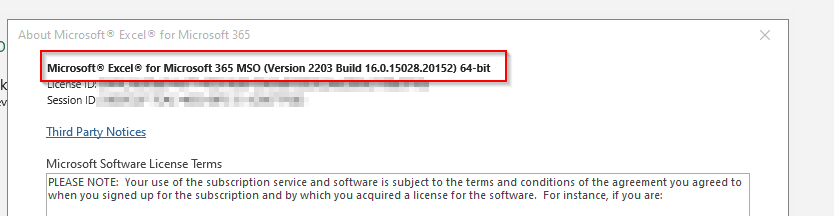
From within an Office application, select the File menu, and then choose Account and About Excel.
-
The information we need is at the top:
Office (MAC)
-
Open Excel
-
Click on Excel > About Microsoft Excel
Windows
-
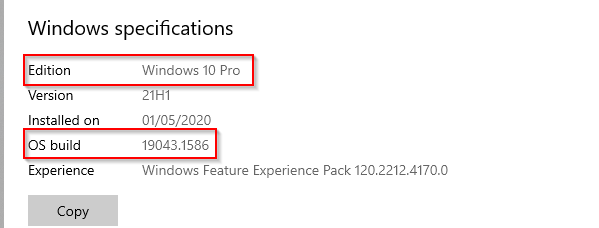
Select the Start button > Settings > System > About
-
Check the Edition and OS build under Windows specifications
-
You can also copy all the information to clipboard
Microsoft Edge with WebView2 (Windows only)
-
Select the Start button > Settings > Apps
-
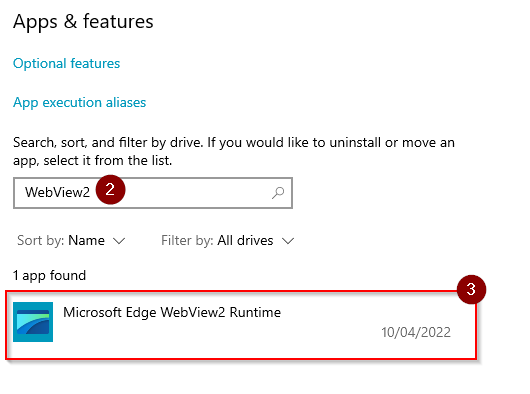
Type WebView2 in the search field
-
Microsoft Edge WebView2 Runtime should be found