ELPRC3METHODOLOGY
Summary
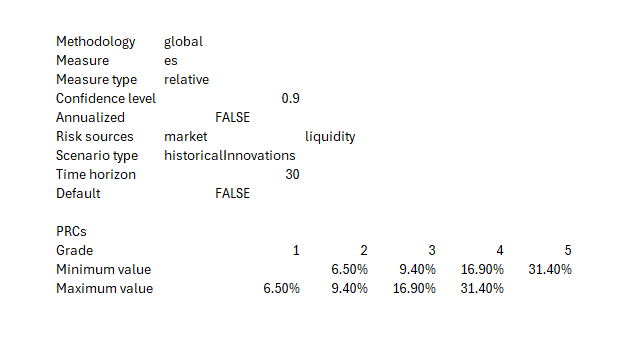
The ELPRC3METHODOLOGY function returns 3 types of output. If no parameters are inserted, the output will be the Edgelab methodologies that can be inserted as the first parameter e.g. "global". If only "MethodologyName" is specified, you'll get the summarized view, namely a table with the PRC levels and their intervals (maximum and minimum value) - the value is the relative ES. Finally, if you set to TRUE "ShowDetails", in addition to the PRC levels and values, you'll have a view of the different parameters used during the calibration (e.g. confidence level, time horizon, etc).
Examples
=ELPRC3METHODOLOGY("2020q3", TRUE)
Retrieves the parameters used in the PRC3 calibration and the intervals provided by the distribution of relative ES.
Syntax
ELPRC3METHODOLOGY(methodologyName, showDetails)
| Argument name | Default | Description |
|---|---|---|
| methodologyName | global | |
| showDetails (Optional) | FALSE | Boolean, if set to TRUE, the parameters used in the calibration are shown, or else only the PRC levels and the intervals are displayed. |